PENUMBRAHARMECS LABS
KaufenBuy
Schach-Lernsoftware · Stockfish 19Chess training software · Stockfish 19

Die Engine denkt mit. Das Spiel bleibt deins.The engine thinks with you. The game stays yours.

Der Gegner zieht, du trägst den Zug ein, Penumbra markiert drei Vorschläge in Farbe – und du entscheidest. Einmal kaufen, offline spielen, ohne Abo und ohne Autopilot.

The opponent moves, you enter the move, Penumbra marks three suggestions in colour – and you decide. Buy once, play offline, no subscription and no autopilot.

  • Einmalig, kein AboOne-time, no subscription
  • Alle Updates gratisAll updates free
  • 100 % offline100 % offline
  • Kein Konto, kein TrackingNo account, no tracking
  • Windows 10/11 · Linux · Android demnächstWindows 10/11 · Linux · Android soon
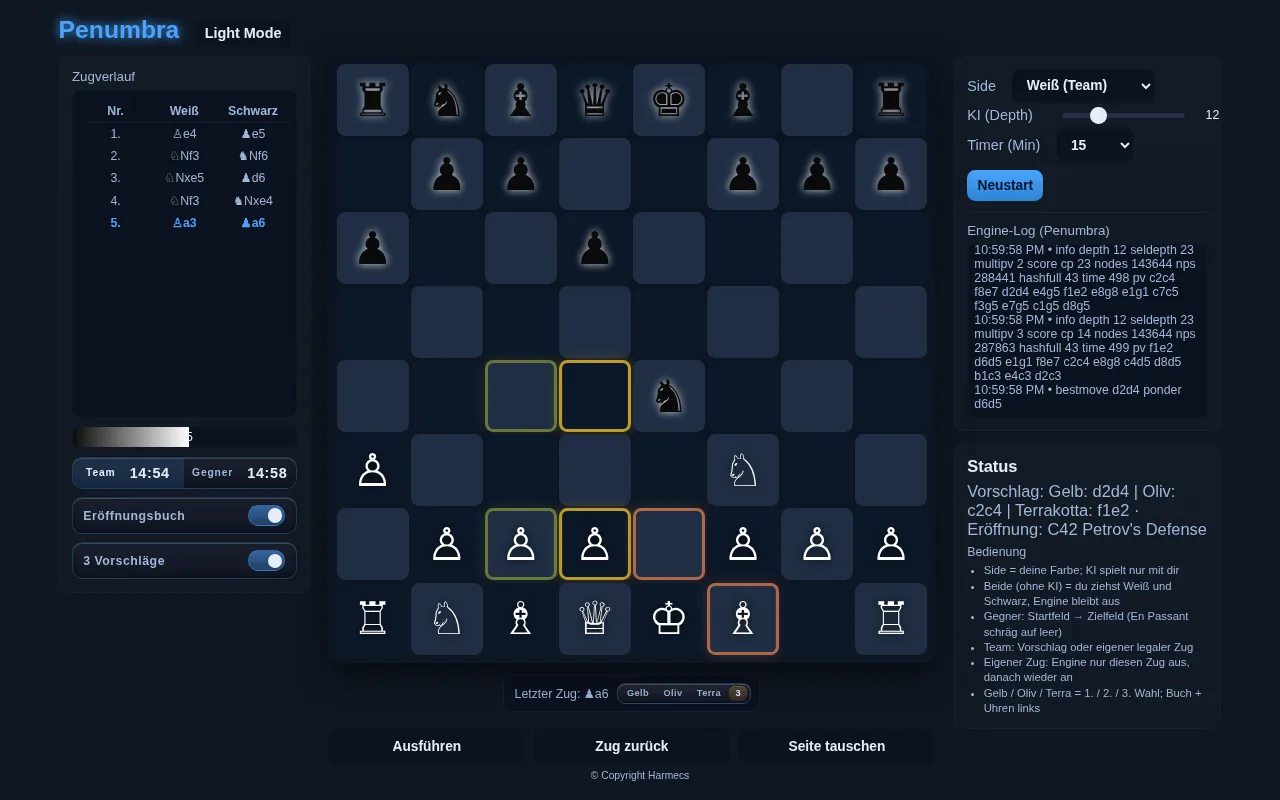
Penumbra Chess auf dem PC im Nachtmodus: Brett mit drei farbigen Vorschlägen, Zugverlauf, Uhren sowie Eröffnungsnamen und ECO-Code im Panel „Eröffnung“
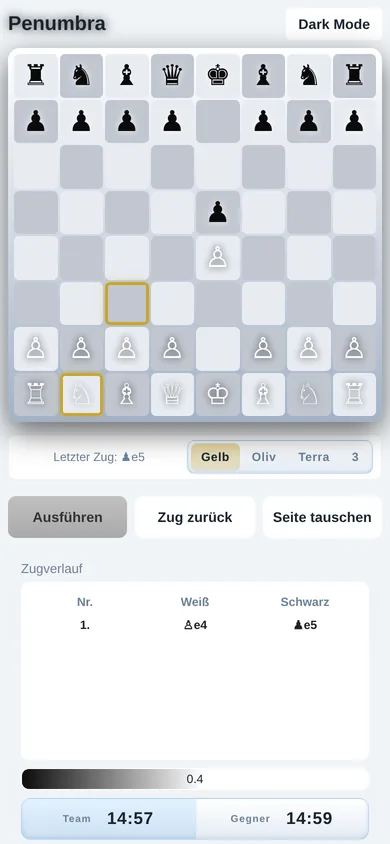
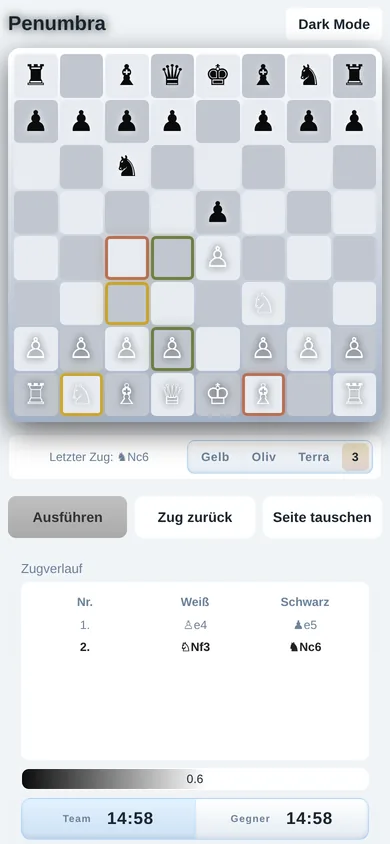
Penumbra Chess als Android-App im Hochformat

Keine Betrugssoftware. Penumbra ist ein Lern- und Trainingswerkzeug. Es darf nicht zum Cheaten in Turnieren, Clubpartien oder Online-Wettkämpfen verwendet werden. Jede nutzende Person trägt die Verantwortung – je nach Rechtslage des Landes und den Regeln der Veranstaltung.

Not cheating software. Penumbra is a learning and training tool. It must not be used as engine assistance in tournaments, club games or online competitions. Each user is responsible under local law and the rules of the event.

Der AblaufThe flow

Ihr spielt zusammen. Der Gegner sitzt gegenüber.You play together. The opponent sits across the board.

Penumbra zieht nie von allein. Die Engine ist Coach und Partner: Sie analysiert, markiert Vorschläge, fordert dich – und wartet auf deine Entscheidung.

Penumbra never moves on its own. The engine is coach and partner: it analyses, marks suggestions, challenges you – and waits for your decision.

  1. 01

    Gegner ziehtOpponent moves

    Du überträgst den Zug per Klick: Startfeld, dann Zielfeld. Das Brett aktualisiert sich. Weiß beginnt, wenn du Weiß führst.

    You enter the move by clicking: origin square, then destination. The board updates. White starts if you play White.

  2. 02

    Penumbra rechnetPenumbra calculates

    Die Engine schreibt ins Log, setzt den Status und markiert Vorschläge farbig: Gelb erste Wahl, Oliv zweite, Terrakotta dritte. Noch zieht niemand.

    The engine writes to the log, updates the status and colours its suggestions: yellow first choice, olive second, terracotta third. Nobody has moved yet.

  3. 03

    Du entscheidestYou decide

    „Ausführen“ für den markierten Zug – oder selbst einen anderen Zug wählen. Lernen sitzt genau in dieser Pause.

    “Execute” for the marked move – or choose another move yourself. The learning sits in exactly that pause.

  4. 04

    WeiterContinue

    Dein Zug steht. Das Programm wartet auf den nächsten Gegnerzug. Verlauf, Uhr und Status bleiben im Blick.

    Your move is on the board. The program waits for the next opponent move. History, clock and status stay in view.

Drei VorschlägeThree suggestions

Alternativen sehen, nicht nur eine Linie.See alternatives, not just one line.

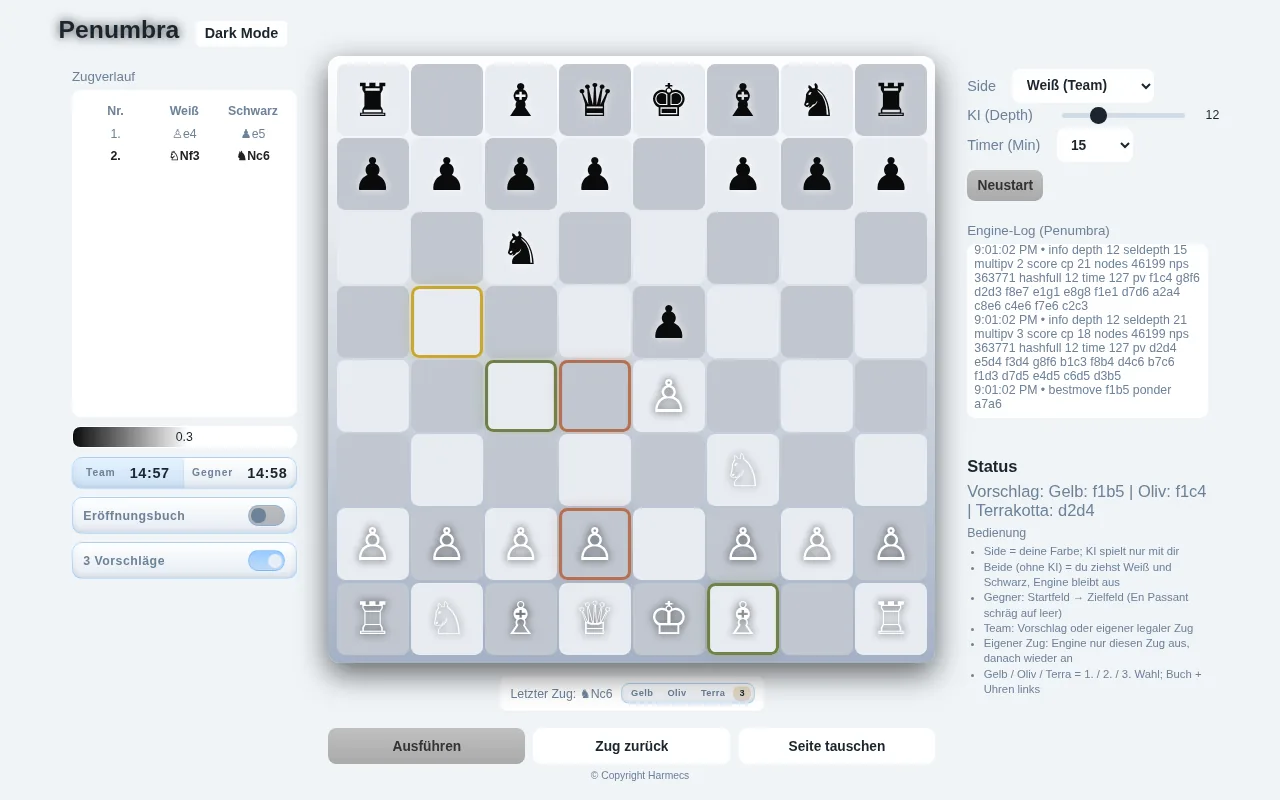
Penumbra zeigt die drei besten Züge direkt auf dem Brett – jeweils Start- und Zielfeld in der Farbe ihres Rangs. Mit dem Schalter 3 Vorschläge erscheinen alle drei automatisch in jedem Zug; die Einstellung bleibt gespeichert.

Penumbra shows the three best moves right on the board – origin and destination square in the colour of their rank. With the 3 Vorschläge (3 suggestions) switch all three appear automatically every move; the setting is remembered.

  • GelbYellowBester Zug – erste Wahl der EngineBest move – the engine’s first choice
  • OlivOliveZweitbester ZugSecond-best move
  • TerrakottaTerracottaDrittbester ZugThird-best move

FunktionenFeatures

Alles, was ein Trainingsbrett braucht. Nichts, was ablenkt.Everything a training board needs. Nothing that distracts.

Benutzerfreundlich, lernstark, klar gebaut: links die Partie, in der Mitte das Brett, rechts Engine und Einstellungen.

Easy to use, built for learning, clearly laid out: the game on the left, the board in the centre, engine and settings on the right.

19Stockfish-Version mit NNUEStockfish version with NNUE
3.919Varianten im Eröffnungsbuchvariations in the opening book
500ECO-Codes A00–E99ECO codes A00–E99
1–42Suchtiefe per Schiebereglersearch depth via slider
1.449.802Taktikaufgaben am PCtactics puzzles on PC
65Themen im Thementrainingthemes for theme training
0 €für alle künftigen Updatesfor all future updates
3Rätsel-Modi: Sprint, Sturm, SeriePuzzle modes: Sprint, Storm, Streak

Stockfish 19 mit NNUEStockfish 19 with NNUE

Im Kern rechnet Stockfish 19 – eine der stärksten Schach-Engines der Welt – mit seinem neuronalen Netz (NNUE), lokal auf deinem Gerät. Standardtiefe am PC 12, auf dem Smartphone 8; per Regler jederzeit von 1 bis 42 einstellbar.

At its core, Stockfish 19 – one of the strongest chess engines in the world – calculates with its neural network (NNUE), locally on your device. Default depth 12 on PC and 8 on phones; adjustable from 1 to 42 at any time.

Stockfish 19NNUElokal & offlinelocal & offline

Tiefe per SchiebereglerDepth slider

Von 1 bis 42 – du bestimmst, wie hart die Engine nachdenkt. Große Tiefen brauchen Zeit: Penumbra ist ein Lernwerkzeug, kein Allwissen.

From 1 to 42 – you decide how hard the engine thinks. Deep searches take time: Penumbra is a learning tool, not omniscience.

Eröffnungsbuch mit 3.919 VariantenOpening book with 3,919 variations

Alle 500 ECO-Codes von A00 bis E99 – inklusive der Exoten: Bongcloud, Grob, Orang-Utan (Polnisch), Englund-Gambit, Lettisches Gambit, Halloween-Gambit, Frankenstein-Dracula, Monkey’s Bum und viele mehr. Die Eröffnung wird gewichtet zufällig gewählt, damit jede Partie anders beginnt. Im Panel „Eröffnung“ stehen die Namen der Eröffnung für Weiß und Schwarz samt ECO-Code.

All 500 ECO codes from A00 to E99 – including the exotics: Bongcloud, Grob, Orangutan (Polish), Englund Gambit, Latvian Gambit, Halloween Gambit, Frankenstein-Dracula, Monkey’s Bum and many more. The opening is chosen at weighted random so every game starts differently. The “Opening” panel shows the opening names for White and Black together with the ECO code.

C42 Petrov’s DefenseB00 …E99 …

SchachuhrenChess clocks

Team und Gegner mit eigener Uhr. Bedenkzeit in Minuten wählbar (5 bis 90) oder ganz ohne Uhr.

Team and opponent each with their own clock. Time in minutes selectable (5 to 90) or no clock at all.

BewertungsbalkenEvaluation bar

Die schmale Skala zeigt, welche Seite im Vorteil ist. 0.0 ist Ausgleich.

The slim scale shows which side is better. 0.0 is equal.

ZugverlaufMove history

Tabelle Weiß / Schwarz. Jeder Zug bleibt stehen, der letzte Zug wird unter dem Brett angezeigt.

White / Black table. Every move stays listed; the last move is shown below the board.

Volle KontrolleFull control

Ausführen, Zug zurück, Seite tauschen und Neustart – lernen ohne Strafe.

Execute, Undo, Swap sides and Restart – learn without penalty.

Engine-LogEngine log

Die Engine schreibt mit: Tiefe, Bewertung, Varianten, bester Zug. Nachvollziehbar statt Blackbox.

The engine writes it all down: depth, evaluation, lines, best move. Traceable instead of a black box.

Modus „Beide (ohne KI)““Both (no AI)” mode

Du ziehst Weiß und Schwarz selbst, die Engine bleibt aus – ideal, um Stellungen und Strategien durchzuspielen.

You play both White and Black yourself and the engine stays off – ideal for working through positions and strategies.

Tag- und NachtmodusDay and night mode

Ein Klick oben links im Programm – dieselbe Fläche, anderes Licht. Für Partien spät in der Nacht.

One click at the top left of the program – same surface, different light. For games late at night.

Panel „Eröffnung““Opening” panel

Getrennt für Weiß und Schwarz: der Name der gespielten Eröffnung plus ECO-Code – in der deutschen Version auf Deutsch (rund 150 übersetzte Namen, z. B. Sizilianische Verteidigung, Spanische Partie, Wolga-Gambit), in der englischen Version mit den englischen Originalnamen.

Separately for White and Black: the name of the opening being played plus the ECO code – in the English version with the original English names (e.g. Sicilian Defense, Ruy Lopez, Volga Gambit), in the German version with around 150 translated German names.

Hilfe „Bedienung !““Bedienung !” help

Ein Klick öffnet die sechs Kurzregeln der Bedienung: Seite, Modus ohne KI, Gegnerzug eingeben, Team-Zug, eigener Zug, Farben. Sofort startklar.

One click opens the six short rules: side, no-AI mode, entering the opponent’s move, team move, own move, colours. Ready to go right away.

Taktik Go inklusiveTactics Go included

Ein eigener Trainingsbereich mit 1.449.802 Aufgaben am PC und 15.000 auf Android, Tagesaufgabe, Thementraining und drei Rätselmodi. Mehr dazu ↓

A dedicated training area with 1,449,802 puzzles on PC and 15,000 on Android, daily puzzle, theme training and three puzzle modes. More ↓

Offline. Ohne Werbung, Abo, Konto oder Datensammlung.Offline. No ads, subscription, account or data collection.

Penumbra läuft vollständig auf deinem Gerät. Keine Anmeldung, keine Werbung, kein Tracking – die App selbst sendet nichts ins Internet. Fortschritt und Rekorde liegen lokal bei dir.

Penumbra runs entirely on your device. No sign-up, no ads, no tracking – the app itself sends nothing to the internet. Progress and records stay locally with you.

Die Zahl möglicher Schachpartien liegt in der Größenordnung von 10120 (Shannon-Zahl). Deshalb bleibt auch hohe Suchtiefe ein Werkzeug zum Verstehen – kein Allwissen.

The number of possible chess games is on the order of 10120 (the Shannon number). That is why even deep search remains a tool for understanding – not omniscience.

Taktik Go · Training & RätselTactics Go · training & puzzles

1.449.802 Aufgaben. Ein Knopf im Spiel.1,449,802 puzzles. One button in the game.

Mit „Taktik Go“ öffnet sich ein eigener Trainingsbereich mit eigenem Brett und eigener Stockfish-Instanz. Der Gegnerzug wird automatisch gespielt, dann findest du die beste Fortsetzung. Die Aufgaben stammen aus der freien Lichess-Puzzle-Datenbank (CC0), am PC sorgfältig gefiltert auf 1.449.802 beliebte, vielfach gespielte Aufgaben – auf Android 15.000.

“Tactics Go” opens a dedicated training area with its own board and its own Stockfish instance. The opponent’s move is played automatically, then you find the best continuation. The puzzles come from the free Lichess puzzle database (CC0), carefully filtered on PC to 1,449,802 popular, frequently played puzzles – 15,000 on Android.

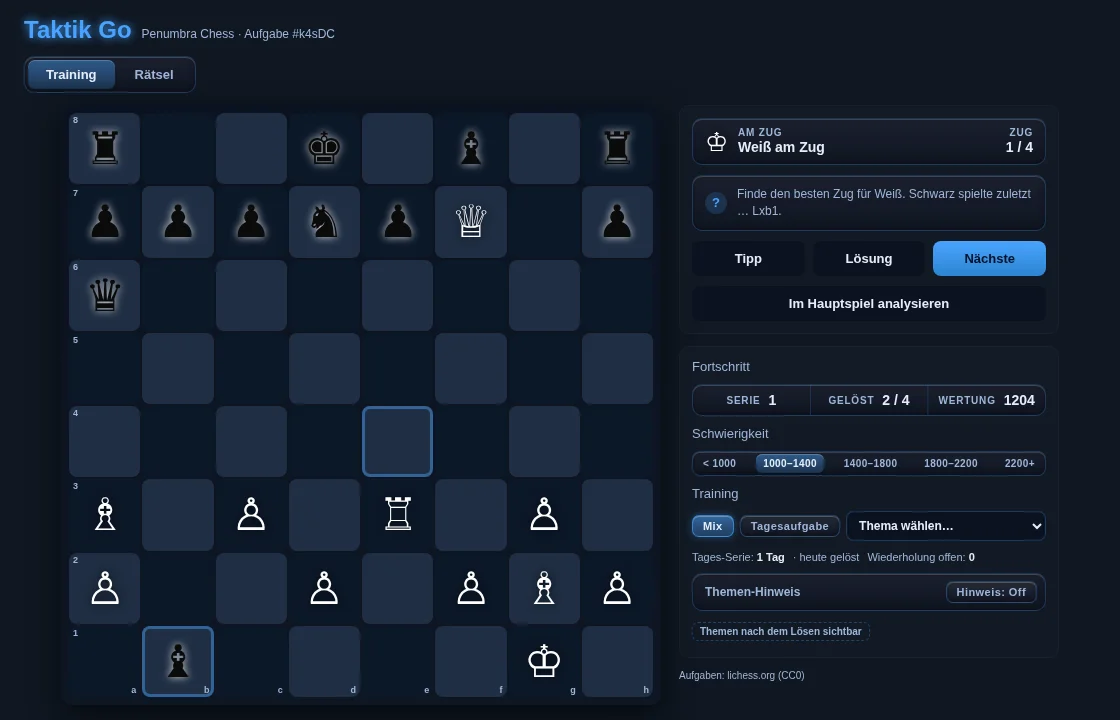
Taktik Go am PC im Nachtmodus: Aufgabe mit Tipp, Lösung, Nächste, Fortschritt, Schwierigkeitsstufen und Thema-Auswahl
PC · Training mit Tipp, Lösung, Wertung und 5 StufenPC · training with hint, solution, rating and 5 levels
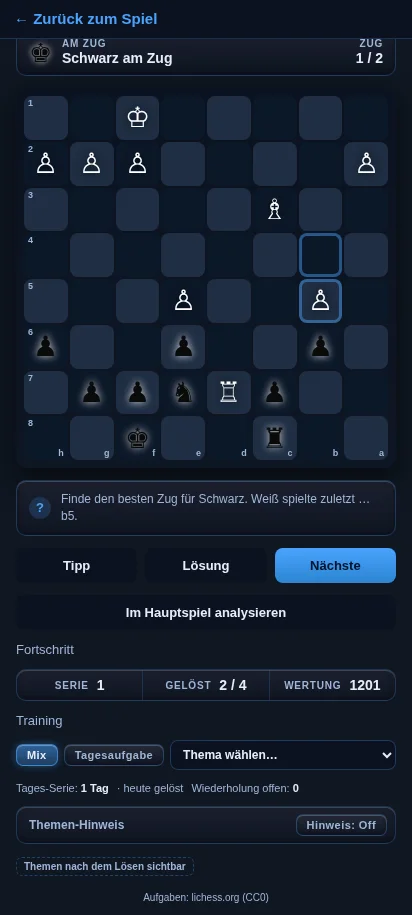
Taktik Go auf dem Android-Smartphone im Nachtmodus
Android · TrainingAndroid · training

5 Stufen, 65 Themen5 levels, 65 themes

Von unter 1000 bis 2200+. Thementraining mit 65 Themen – Gabel, Fesselung, Grundreihenmatt, Anastasia-Matt und mehr. Modus Mix für Abwechslung.

From below 1000 to 2200+. Theme training with 65 themes – fork, pin, back-rank mate, Anastasia’s mate and more. Mix mode for variety.

Tipp · Lösung · NächsteHint · Solution · Next

Tipp markiert die zu ziehende Figur, Lösung spielt die Musterlösung animiert vor. Der Schalter „Hinweis“ zeigt die Themen vorher – oder erst nach dem Lösen.

Hint marks the piece to move, Solution plays the solution animated. The “Hinweis” toggle shows the themes beforehand – or only after solving.

Stockfish prüft AlternativenStockfish checks alternatives

Jedes Matt zählt. Findest du einen anderen, ebenfalls gewinnenden Zug, prüft Stockfish ihn und erkennt ihn an – statt stur nur eine Lösung gelten zu lassen.

Every mate counts. If you find another winning move, Stockfish checks it and accepts it – instead of rigidly allowing only one solution.

Fehler-WiederholungMistake review

Falsch gelöste Aufgaben kommen gestaffelt wieder (nach 3, 8 und 20 Aufgaben), bis du sie dreimal sauber löst. So bleibt hängen, was du übst.

Puzzles you got wrong come back in steps (after 3, 8 and 20 puzzles) until you solve them cleanly three times. What you practise sticks.

Tagesaufgabe mit SerieDaily puzzle with streak

Jeden Tag eine feste Aufgabe, dazu deine Tages-Serie in Tagen und eine eigene Wertung, die mit dir wächst.

A fixed puzzle every day, plus your daily streak and a personal rating that grows with you.

Im Hauptspiel analysierenAnalyse in the main game

Ein Klick übergibt die Stellung ans Hauptbrett – dort rechnet Stockfish weiter und zeigt seine drei Vorschläge.

One click hands the position to the main board – there Stockfish keeps calculating and shows its three suggestions.

Rätsel: drei Modi gegen die Uhr – oder gegen dich selbstPuzzles: three modes against the clock – or yourself

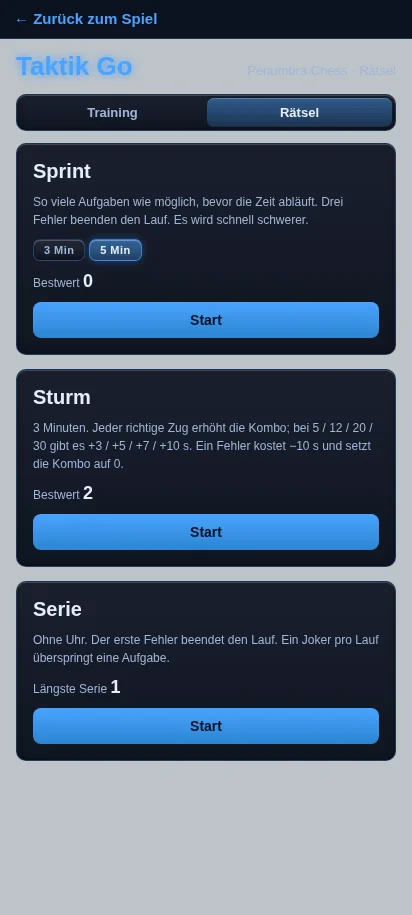
Rätsel-Übersicht auf Android: Sprint, Sturm und Serie mit Bestwerten
Android · Rätsel-ModiAndroid · puzzle modes
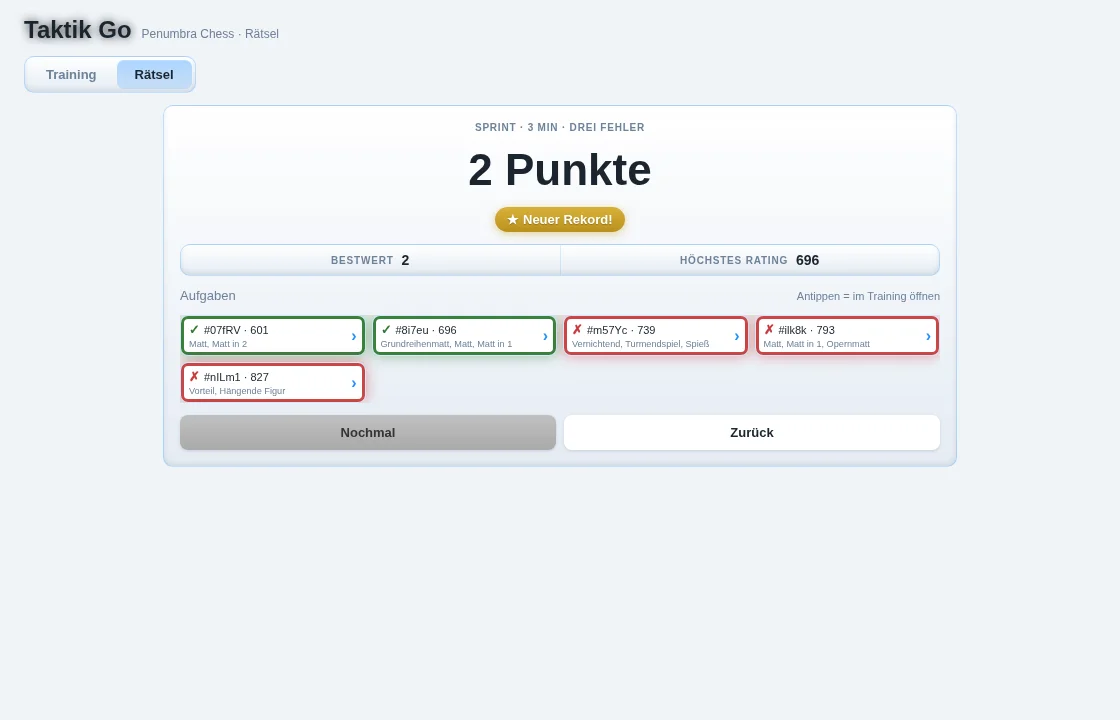
Ergebnis eines Sprint-Laufs am PC mit goldenem Abzeichen „Neuer Rekord!“ und Aufgabenliste
PC · Ergebnis mit „Neuer Rekord!“PC · result with “New record!”

Sprint

3 oder 5 Minuten: so viele Aufgaben wie möglich. Drei Fehler beenden den Lauf, die Aufgaben werden schnell schwerer.

3 or 5 minutes: as many puzzles as possible. Three mistakes end the run, and the puzzles get harder quickly.

Sturm

3 Minuten mit Kombo: Zeitbonus +3, +5, +7 und +10 s für Serien richtiger Züge. Ein Fehler kostet −10 s.

3 minutes with combo: time bonuses of +3, +5, +7 and +10 s for streaks of correct moves. A mistake costs −10 s.

Serie

Ohne Uhr, in Ruhe – der erste Fehler beendet den Lauf. Ein Joker pro Lauf überspringt eine Aufgabe.

No clock, at your own pace – the first mistake ends the run. One joker per run skips a puzzle.

Lokale Rekorde je Modus mit goldenem „Neuer Rekord!“, Liste der „Letzten Läufe“ und jede Aufgabe des Laufs zum Nachüben im Training. Alles bleibt auf deinem Gerät.

Local records per mode with a golden “New record!” badge, a list of recent runs (“Recent runs”) and every puzzle of the run available to practise again in training. Everything stays on your device.

Neu in 1.0.12New in 1.0.12

Nach der Partie: verstehen, was passiert ist.After the game: understand what happened.

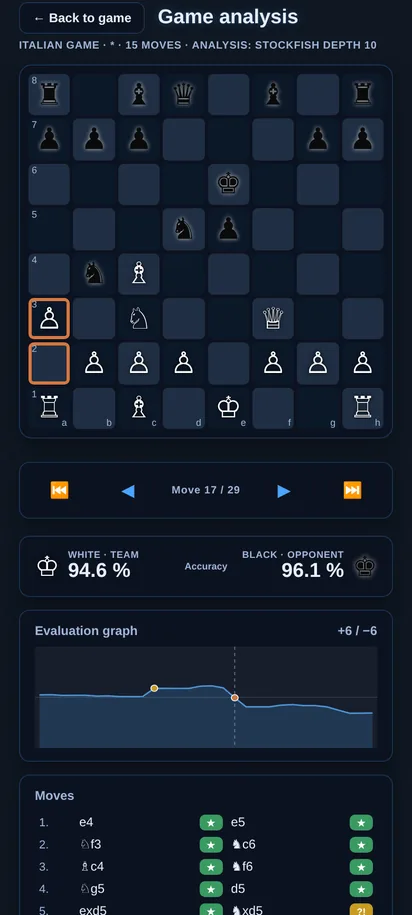
Ist die Partie vorbei – durch Matt, Remis, Zeit oder Aufgeben –, wird der Knopf „Analyse“ frei. Stockfish geht jeden Zug noch einmal durch und zeigt ruhig, wo die Partie gekippt ist. Dazu kommen Computergegner in acht Stufen und ein Aufgeben-Knopf.

Once the game is over – by mate, draw, time or resignation – the “Analysis” button unlocks. Stockfish goes through every move again and calmly shows where the game turned. On top of that: computer opponents in eight levels and a resign button.

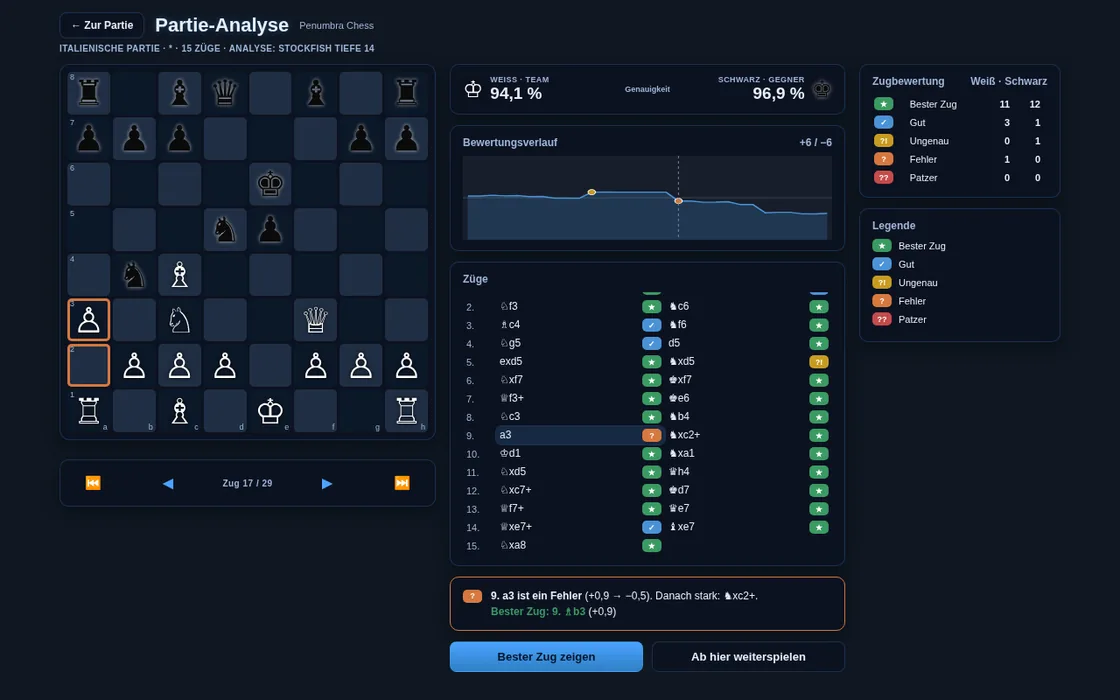
Partie-Analyse am PC im Nachtmodus: Genauigkeit für beide Seiten, Bewertungsverlauf, Zugliste mit Bewertungen, Erklärung zum Fehler und bester Zug
PC · Partie-Analyse mit Genauigkeit, Verlauf und Zugbewertung
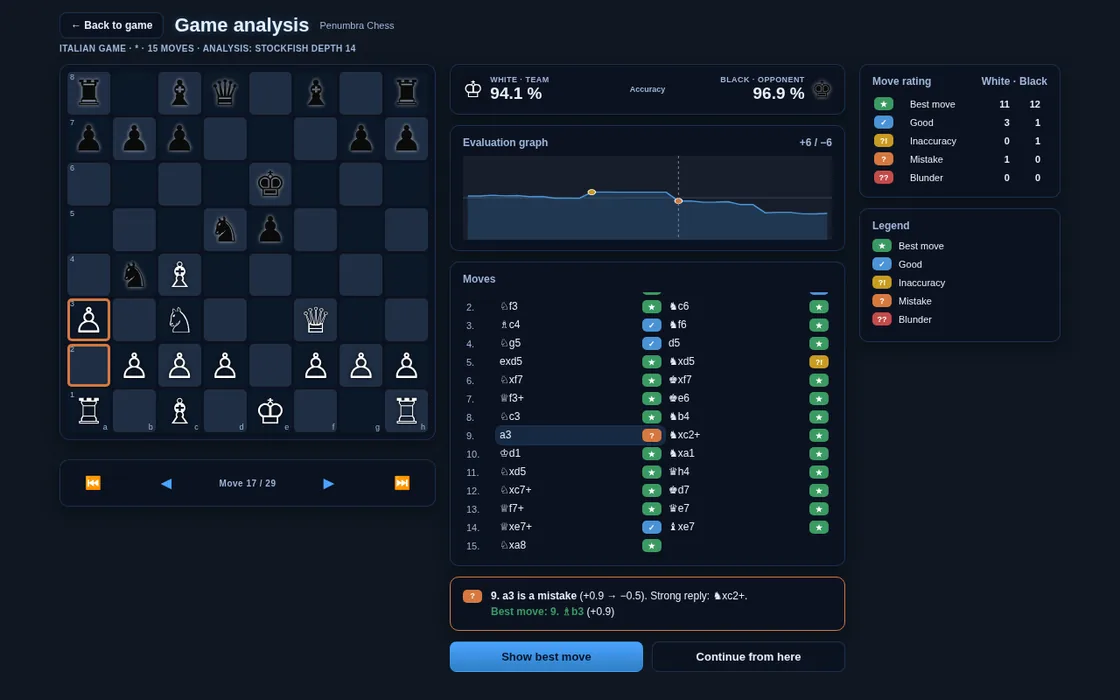
Game analysis on PC in night mode: accuracy for both sides, evaluation curve, move list with ratings, explanation of the mistake and best move
PC · game analysis with accuracy, curve and move ratings
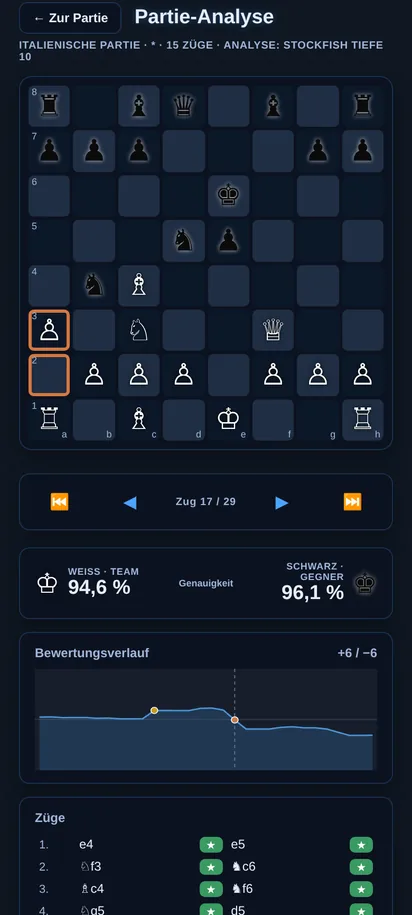
Partie-Analyse auf dem Android-Smartphone im Nachtmodus
Android · Partie-Analyse
Game analysis on an Android smartphone in night mode
Android · game analysis

Genauigkeit & VerlaufAccuracy & curve

Eine Genauigkeit in Prozent für Weiß und Schwarz und ein Bewertungsverlauf über die ganze Partie. Mit den Pfeilen springst du Zug für Zug durch.

An accuracy percentage for White and Black and an evaluation curve across the whole game. Use the arrows to step through it move by move.

Jeder Zug bewertetEvery move rated

Bester Zug, Gut, Ungenau, Fehler oder Patzer – mit Zählung je Seite. Zu jedem Zug eine kurze Erklärung, was Stockfish stattdessen gespielt hätte.

Best move, Good, Inaccuracy, Mistake or Blunder – counted for each side. For each move a short explanation of what Stockfish would have played instead.

Besten Zug zeigenShow best move

„Besten Zug zeigen“ markiert die stärkere Fortsetzung auf dem Brett. Mit „Ab hier weiterspielen“ probierst du sie direkt im Hauptspiel aus.

“Show best move” marks the stronger continuation on the board. With “Continue from here” you try it straight away in the main game.

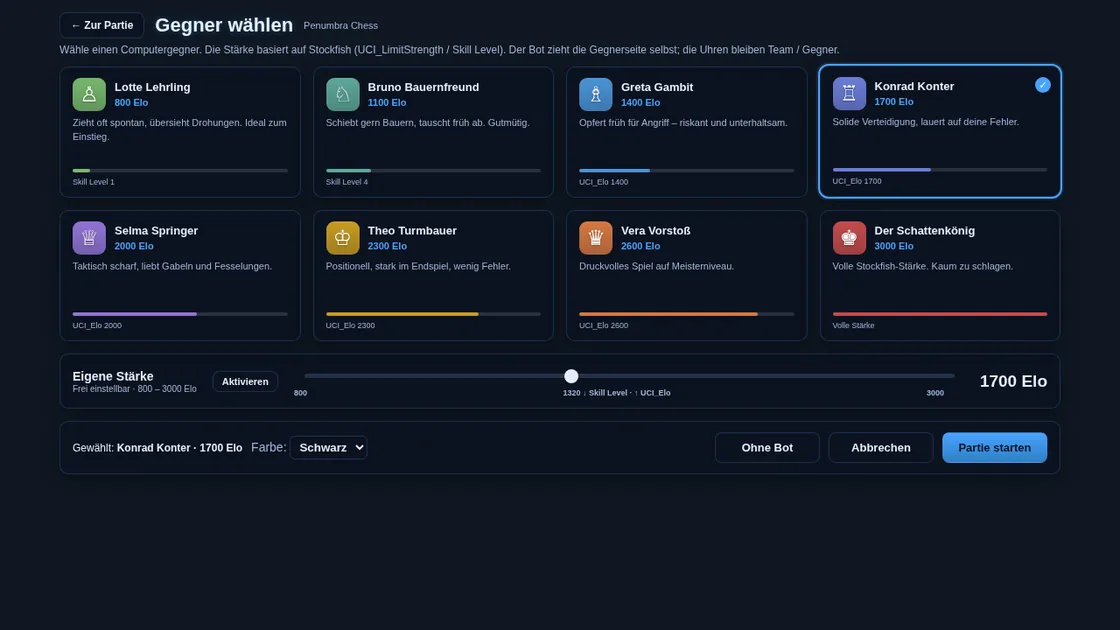
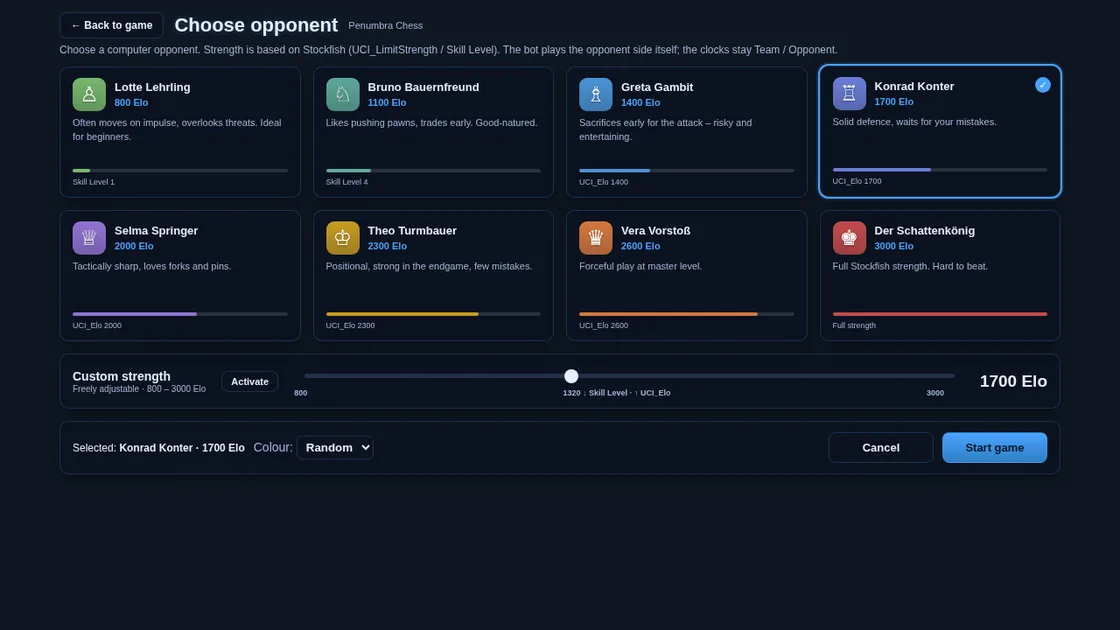
Gegner-Stufen: acht Bots von 800 bis 3000 EloOpponent levels: eight bots from 800 to 3000 Elo

Gegner wählen am PC: acht Bots von 800 bis 3000 Elo, Regler für eigene Stärke, Farbwahl und „Partie starten“
PC · Gegner wählen
Choose opponent on PC: eight bots from 800 to 3000 Elo, custom strength slider, colour choice and “Start game”
PC · choose opponent

Acht CharaktereEight characters

Von Lotte Lehrling (800) bis zum Schattenkönig (3000, volle Stockfish-Stärke). Der Bot zieht seine Seite selbst; die Uhren bleiben Team / Gegner.

From Lotte Lehrling (800) to the Schattenkönig (3000, full Stockfish strength). The bot plays its side itself; the clocks stay Team / Opponent.

Eigene Stärke & FarbeCustom strength & colour

Ein Regler stellt jede Stärke von 800 bis 3000 Elo ein. Farbe Weiß, Schwarz oder zufällig. Deine Wahl wird lokal gespeichert und beim nächsten Start wiederhergestellt.

A slider sets any strength from 800 to 3000 Elo. Colour White, Black or random. Your choice is saved locally and restored on the next start.

AufgebenResign

Ein eigener Knopf mit Sicherheitsabfrage beendet die Partie sauber – danach steht die Analyse bereit.

A dedicated button with a confirmation ends the game cleanly – the analysis is ready right after.

Für Bestandskunden ist 1.0.12 ein kostenloses Update. Die Bot-Stärken beruhen auf Stockfish (UCI_LimitStrength bzw. Skill Level) und sind Richtwerte, keine offiziellen Elo-Zahlen.

For existing customers 1.0.12 is a free update. The bot strengths are based on Stockfish (UCI_LimitStrength or Skill Level) and are guide values, not official Elo ratings.

PlattformenPlatforms

Am Schreibtisch und unterwegs.At your desk and on the go.

Windows 10 / 11 VerfügbarAvailable

  • Echtes Windows-Programm mit Installer
  • Skaliert auf jeden Monitor – vom Laptop bis zum großen Bildschirm
  • Stockfish 19 mit NNUE, 1.449.802 Taktikaufgaben
  • A real Windows program with installer
  • Scales to any monitor – from laptop to large display
  • Stockfish 19 with NNUE, 1,449,802 tactics puzzles

Android Demnächst im Play StoreComing soon to Play Store

  • Smartphone: eigenes Hochformat-Layout
  • Tablet: volles Layout wie am PC
  • Stockfish 19 mit NNUE und Taktik Go
  • Phone: dedicated portrait layout
  • Tablet: the full layout, like on PC
  • Stockfish 19 with NNUE and Tactics Go

Linux VerfügbarAvailable

  • AppImage und .deb (64-Bit) – läuft auf Ubuntu, Debian, Mint, Fedora und Co.
  • Gleiche Oberfläche wie am Windows-PC
  • Stockfish 19 mit NNUE, 1.449.802 Taktikaufgaben
  • AppImage and .deb (64-bit) – runs on Ubuntu, Debian, Mint, Fedora and more
  • Same interface as on the Windows PC
  • Stockfish 19 with NNUE, 1,449,802 tactics puzzles
PC im Tagmodus: alle drei Vorschläge Gelb, Oliv und Terrakotta gleichzeitig auf dem Brett
PC · Tagmodus · 3 VorschlägePC · day mode · 3 suggestions
Android-Smartphone mit drei farbigen Vorschlägen
Android · 3 VorschlägeAndroid · 3 suggestions

ErklärvideoExplainer video

In wenigen Minuten verstanden.Understood in a few minutes.

Das Video läuft direkt hier auf der Seite – ohne Einbettung externer Dienste.

The video plays right here on the page – no external services embedded.

Auf YouTube öffnenOpen German version on YouTube

PreisPrice

Ein Preis. Einmal. Für immer deins.One price. Once. Yours to keep.

Penumbra Chess für Windowsfor Windows

Volle Lernumgebung, lokal auf deinem PC: Stockfish 19, drei farbige Vorschläge, Eröffnungsbuch mit allen 500 ECO-Codes, Tiefe bis 42, Uhren, Verlauf – und Taktik Go mit 1.449.802 Aufgaben und drei Rätselmodi.

The full training environment, locally on your PC: Stockfish 19, three coloured suggestions, opening book with all 500 ECO codes, depth up to 42, clocks, history – and Tactics Go with 1,449,802 puzzles and three puzzle modes.

  • Volle Software-Lizenz für einen PC
  • Alle künftigen Updates kostenlos – Penumbra wird aktiv weiterentwickelt
  • Kein Abo, kein Konto, keine Werbung
  • Kein automatisches Ziehen – Vorschlag, dann deine Entscheidung
  • Nicht für Turniere, Clubpartien oder Online-Wettkämpfe als Engine-Hilfe
  • Full software licence for one PC
  • All future updates free – Penumbra is actively developed
  • No subscription, no account, no ads
  • No automatic moving – a suggestion, then your decision
  • Not for tournaments, club games or online competitions as engine assistance
EinmalzahlungOne-time payment
 €einmalig€once
Jetzt kaufen – Buy now –

Eine Lizenz = ein PC. Nach der Installation zeigt Penumbra eine Geräte-ID. Diese sendest du uns, und du erhältst deinen persönlichen Freischalt-Code für genau diesen PC.

One licence = one PC. After installation Penumbra shows a device ID. Send it to us and you receive your personal activation code for exactly that PC.

InstallationInstallation

Systemvoraussetzungen & erster StartSystem requirements & first launch

SystemvoraussetzungenSystem requirements

Windows
Windows 10 oder 11, 64-BitWindows 10 or 11, 64-bit
SpeicherStorage
ca. 160 MB Download, ca. 450 MB installiertapprox. 160 MB download, approx. 450 MB installed
ProzessorCPU
Jeder aktuelle PC. Je schneller die CPU, desto schneller sind große Tiefen erreicht.Any current PC. The faster the CPU, the quicker deep searches finish.
BildschirmDisplay
Beliebig – die Oberfläche skaliertAny – the interface scales
Internet
Nur für den Download. Gespielt wird offline.Only for the download. Play is offline.
Linux
64-Bit, AppImage oder .deb64-bit, AppImage or .deb
Android
Ab Android 7.0 – demnächst im Play StoreAndroid 7.0 or later – coming soon to Play Store

Windows-Warnung beim InstallierenWindows warning during installation

Keine Sorge: Penumbra ist (noch) nicht mit einem teuren Code-Signatur-Zertifikat signiert. Deshalb fragt Windows beim ersten Start nach.

Don’t worry: Penumbra is not (yet) signed with an expensive code-signing certificate, so Windows asks once on first launch.

  1. Erscheint „Der Computer wurde durch Windows geschützt“ (SmartScreen), klicke auf Weitere Informationen.
  2. Dann auf Trotzdem ausführen – die Installation startet.
  3. Dein Virenschutz fragt eventuell einmal nach. Erlaube die Ausführung, danach ist Ruhe.
  4. If “Windows protected your PC” (SmartScreen) appears, click More info.
  5. Then Run anyway – the installation starts.
  6. Your antivirus may ask once. Allow it, and that’s it.

EinordnungContext

Coach statt Autopilot.A coach, not an autopilot.

Suchtiefe ist ein Einstellwert, kein Zauberwort. Was Penumbra ausmacht, ist der Ablauf: Die Engine rechnet im Hintergrund, zeigt dir Alternativen in Farbe und überlässt dir den Zug. Penumbra will keine Profi-Analysesuite und keine Online-Plattform ersetzen – es ist ein ruhiges, lokales Trainingsbrett für alle, die Schach verstehen wollen.

Online-Plattformen wie Chess.com oder Lichess sind großartig zum Spielen gegen Menschen weltweit; viele ihrer Trainingsfunktionen sind dort an ein Konto oder ein Abo gebunden. Penumbra setzt anders an: einmal 49 € statt laufender Gebühren, kein Konto, keine Werbung, offline nutzbar – und alle Updates inklusive. Viele nutzen beides: online spielen, mit Penumbra in Ruhe trainieren.

Search depth is a setting, not a magic word. What makes Penumbra different is the flow: the engine calculates in the background, shows you alternatives in colour and leaves the move to you. Penumbra doesn’t try to replace a professional analysis suite or an online platform – it is a calm, local training board for anyone who wants to understand chess.

Online platforms such as Chess.com or Lichess are great for playing people worldwide; many of their training features there are tied to an account or a subscription. Penumbra takes a different approach: €49 once instead of ongoing fees, no account, no ads, usable offline – and all updates included. Many people use both: play online, train calmly with Penumbra.

Penumbra ist auf dem aktuellen Stand der Technik und wird aktiv weiterentwickelt; Käufer erhalten alle Updates gratis. Die App gibt es auf Deutsch und auf Englisch. Penumbra Chess ist ein unabhängiges Projekt aus der Schweiz, gestartet 2026. Die Website selbst nutzt keine Tracker; einfache Aufrufzahlen stammen höchstens aus den technischen Server-Logs des Hosters.

Penumbra is state of the art and actively developed; buyers get all updates free. The app is available in English and German. Penumbra Chess is an independent project from Switzerland, started in 2026. The website itself uses no trackers; simple visit counts come at most from the host’s technical server logs.

Das SpielThe game

Schach in klarer Sprache.Chess in plain language.

Schach ist ein Strategiespiel für zwei Personen auf 64 Feldern. Jede Seite hat 16 Figuren. Weiß beginnt. Ziel ist Schachmatt: Der König steht im Schach und hat keinen legalen Ausweg.

Chess is a strategy game for two on 64 squares. Each side has 16 pieces. White moves first. The aim is checkmate: the king is in check and has no legal escape.

KönigKingEin Feld in jede Richtung.One square in any direction.
DameQueenBeliebig weit gerade und diagonal.Any distance, straight and diagonal.
TurmRookBeliebig weit horizontal oder vertikal.Any distance, horizontal or vertical.
LäuferBishopBeliebig weit diagonal.Any distance, diagonal.
SpringerKnightZwei plus eins. Darf überspringen.Two plus one. May jump.
BauerPawnVorwärts, schlägt schräg, Umwandlung, en passant.Forward, captures diagonally, promotion, en passant.

Sonderregeln: Rochade, en passant, Umwandlung. Unentschieden unter anderem durch Patt oder die 50-Züge-Regel.

Special rules: castling, en passant, promotion. Draws include stalemate and the fifty-move rule.

FAQ

Kurz beantwortet.Answered briefly.

Was zeigt die Partie-Analyse?What does the game analysis show?

Nach dem Ende einer Partie (Matt, Remis, Zeit oder Aufgeben) wird der Knopf „Analyse“ frei. Stockfish bewertet jeden Zug als Bester Zug, Gut, Ungenau, Fehler oder Patzer, zeigt die Genauigkeit für Weiß und Schwarz, einen Bewertungsverlauf, eine kurze Erklärung und den besten Zug. Mit „Ab hier weiterspielen“ geht es im Hauptspiel weiter.

Once a game is over (mate, draw, time or resignation), the “Analysis” button unlocks. Stockfish rates every move as Best move, Good, Inaccuracy, Mistake or Blunder, shows the accuracy for White and Black, an evaluation curve, a short explanation and the best move. With “Continue from here” you carry on in the main game.

Kann ich gegen Computergegner unterschiedlicher Stärke spielen?Can I play computer opponents of different strengths?

Ja. Unter „Gegner“ wählst du einen von acht Bots von 800 bis 3000 Elo oder stellst eine eigene Stärke von 800 bis 3000 Elo ein, dazu die Farbe. Die Stärken beruhen auf Stockfish (UCI_LimitStrength bzw. Skill Level) und sind Richtwerte. Die Wahl wird lokal gespeichert.

Yes. Under “Opponent” you choose one of eight bots from 800 to 3000 Elo or set a custom strength from 800 to 3000 Elo, plus your colour. The strengths are based on Stockfish (UCI_LimitStrength or Skill Level) and are guide values. Your choice is saved locally.

Was ist Taktik Go?What is Tactics Go?

Taktik Go ist der eingebaute Trainingsbereich von Penumbra Chess: 1.449.802 Taktikaufgaben am PC (15.000 auf Android) aus der Lichess-Datenbank (CC0), 5 Schwierigkeitsstufen, Thementraining mit 65 Themen, Tipp, Lösung und Nächste, ein Hinweis-Schalter, Fehler-Wiederholung, eine Tagesaufgabe mit Tages-Serie und „Im Hauptspiel analysieren“. Stockfish erkennt auch alternative Gewinnzüge an.

Tactics Go is Penumbra Chess’s built-in training area: 1,449,802 tactics puzzles on PC (15,000 on Android) from the Lichess database (CC0), 5 difficulty levels, theme training with 65 themes, hint, solution and next, a hint toggle, mistake review, a daily puzzle with streak and “analyse in main game”. Stockfish also accepts alternative winning moves.

Welche Rätselmodi gibt es?Which puzzle modes are there?

Drei: Sprint (3 oder 5 Minuten, drei Fehler beenden den Lauf), Sturm (3 Minuten, Kombo-Boni von +3/+5/+7/+10 Sekunden, ein Fehler kostet 10 Sekunden) und Serie (ohne Uhr, der erste Fehler beendet den Lauf, ein Joker zum Überspringen). Bestwerte werden lokal gespeichert, mit goldenem „Neuer Rekord!“ und den letzten Läufen.

Three: Sprint (3 or 5 minutes, three mistakes end the run), Storm (3 minutes, combo bonuses of +3/+5/+7/+10 seconds, a mistake costs 10 seconds) and Streak (no clock, the first mistake ends the run, one joker to skip). Best scores are stored locally, with a golden “New record!” badge and your recent runs.

Sind Updates kostenlos?Are updates free?

Ja. Penumbra Chess wird aktiv weiterentwickelt, und wer einmal kauft, erhält alle künftigen Updates kostenlos – ohne Abo und ohne Aufpreis.

Yes. Penumbra Chess is actively developed, and everyone who buys once receives all future updates free – no subscription, no surcharge.

In welcher Sprache ist die App?What language is the app in?

Penumbra Chess ist eine App auf Deutsch und Englisch. Der Windows-Installer fragt nach der Sprache, die Android-App beim ersten Start. Umstellen kannst du jederzeit in der App (unten im Fenster „Bedienung !“) – Fortschritt und Freischaltung bleiben erhalten.

Penumbra Chess is one app in German and English. The Windows installer asks for the language, the Android app asks on first start. You can switch at any time in the app (at the bottom of the “Help !” window) – your progress and activation are kept.

Wie stark ist die Engine?How strong is the engine?

Penumbra nutzt Stockfish 19 mit NNUE, eine der stärksten Schach-Engines der Welt. Die Suchtiefe stellst du von 1 bis 42 ein; Standard ist 12 am PC und 8 auf dem Smartphone.

Penumbra uses Stockfish 19 with NNUE, one of the strongest chess engines in the world. You set the search depth from 1 to 42; the default is 12 on PC and 8 on phones.

Werden meine Daten gespeichert oder übertragen?Is my data stored or transmitted?

Penumbra hat kein Konto und kein Tracking, und die App selbst sendet nichts ins Internet. Einstellungen, Fortschritt und Rekorde liegen lokal auf deinem Gerät. Auf Android kann die Systemsicherung deines Telefons diese lokalen App-Daten – wie bei anderen Apps – in deine eigene Geräte-Sicherung übernehmen.

Penumbra has no account and no tracking, and the app itself sends nothing to the internet. Settings, progress and records are stored locally on your device. On Android, your phone’s system backup may include this local app data in your own device backup, as with other apps.

Wie kann ich Schach lernen, ohne zu schummeln?How can I learn chess without cheating?

Penumbra ist ein Trainingswerkzeug, keine Hilfe für Online-Partien. Die Engine zeigt bis zu drei farbige Vorschläge, zieht aber nie selbst – du entscheidest jeden Zug. Spiel gegen einen Menschen am Brett, geh Eröffnungen durch oder nutze den Modus „Beide (ohne KI)“. In gewerteten Partien, Clubpartien und Online-Wettkämpfen ist Engine-Hilfe verboten.

Penumbra is a training tool, not a helper for online games. The engine shows up to three coloured suggestions but never moves by itself – you decide every move. Play a human at the board, explore openings or use the “Both (no AI)” mode. Engine assistance is forbidden in rated games, club games and online competitions.

Welche Eröffnungen kennt Penumbra?Which openings does Penumbra know?

Das Eröffnungsbuch umfasst 3.919 Varianten und alle 500 ECO-Codes von A00 bis E99 – inklusive Exoten wie Bongcloud, Grob, Orang-Utan, Englund-Gambit, Lettisches Gambit oder Halloween-Gambit. Im Panel „Eröffnung“ stehen die deutschen Namen der Eröffnung für Weiß und Schwarz samt ECO-Code.

The opening book covers 3,919 variations and all 500 ECO codes from A00 to E99 – including exotics such as Bongcloud, Grob, Orangutan, Englund Gambit, Latvian Gambit or Halloween Gambit. The “Opening” panel shows the opening names for White and Black together with the ECO code.

Auf welchen Geräten läuft Penumbra?Which devices does Penumbra run on?

Auf Windows 10 und 11 sowie Linux x64 als AppImage oder .deb (PC, verfügbar). Die Android-App für Smartphone und Tablet kommt demnächst in den Play Store.

On Windows 10 and 11 and on Linux x64 as AppImage or .deb (PC, available now). The Android app for phones and tablets is coming soon to the Play Store.

Was kostet Penumbra?What does Penumbra cost?

Einmalig für eine Lizenz auf einem PC. Kein Abo, keine versteckten Kosten. Nach der Zahlung lädst du die Software herunter und spielst lokal.

once for a licence on one PC. No subscription, no hidden costs. After payment you download the software and play locally.

Zieht die KI von allein?Does the AI move by itself?

Nein. Penumbra schlägt vor und markiert. Ausgeführt wird nur, was du setzt – per „Ausführen“ oder mit deinem eigenen Zug.

No. Penumbra suggests and marks. Only what you play is executed – via “Execute” or with your own move.

Wie funktioniert die Lizenz?How does the licence work?

Jede Lizenz ist an einen PC gebunden. Nach der Installation zeigt Penumbra eine Geräte-ID; dafür erhältst du einen persönlichen Freischalt-Code. Für einen weiteren PC brauchst du eine weitere Lizenz.

Each licence is bound to one PC. After installation Penumbra shows a device ID, for which you receive a personal activation code. Another PC needs another licence.

Brauche ich Internet?Do I need internet?

Nur für den Download. Penumbra läuft vollständig offline – ohne Konto, ohne Werbung, ohne Tracking. Die App sendet nichts ins Internet; Fortschritt und Rekorde werden lokal gespeichert.

Only for the download. Penumbra runs fully offline – no account, no ads, no tracking. The app sends nothing to the internet; progress and records are stored locally.

Für wen ist das?Who is it for?

Für alle, die Schach besser verstehen wollen: gegen einen Menschen am Brett, zum Durchspielen von Eröffnungen oder im Modus „Beide (ohne KI)“ zum Testen eigener Ideen. Nicht für heimliche Engine-Hilfe gegen ahnungslose Gegner.

For anyone who wants to understand chess better: against a human at the board, for exploring openings, or in “Both (no AI)” mode to test your own ideas. Not for covert engine help against unsuspecting opponents.

Darf ich Penumbra im Turnier nutzen?May I use Penumbra in a tournament?

Nein. In gewerteten Partien, Clubpartien und Online-Wettkämpfen ist Engine-Hilfe verboten. Penumbra ist Training. Missbrauch liegt in der Verantwortung der nutzenden Person.

No. Engine assistance is forbidden in rated games, club games and online competitions. Penumbra is for training. Misuse is the user’s responsibility.

Warum dauern große Tiefen so lange?Why do deep searches take so long?

Mit jeder Stufe wächst der Suchbaum stark an. Tiefe 42 ist auf einem Hochleistungsrechner erreichbar, auf einem kleinen Ultrabook sind Stufen um 12 schon viel. Für das Lernen reichen meist mittlere Tiefen.

The search tree grows sharply with every level. Depth 42 is reachable on a high-performance machine; on a small ultrabook, levels around 12 are already a lot. Medium depths are usually plenty for learning.

Windows warnt vor der Installation – ist das normal?Windows warns me during installation – is that normal?

Ja. Die App ist nicht code-signiert. Klicke bei SmartScreen auf „Weitere Informationen“ und dann auf „Trotzdem ausführen“. Ein Virenschutz fragt eventuell einmal nach.

Yes. The app is not code-signed. In SmartScreen click “More info” and then “Run anyway”. Your antivirus may ask once.

Gibt es Penumbra für Android?Is there an Android version?

Ja, die Android-App ist fertig gebaut und kommt demnächst in den Play Store – mit Hochformat-Layout für Smartphones und vollem Layout für Tablets.

Yes, the Android app is built and coming soon to the Play Store – with a portrait layout for phones and the full layout for tablets.

Gibt es ein Erklärvideo?Is there an explainer video?

Ja – direkt auf dieser Seite im Abschnitt „Video“, plus ein Link zu YouTube.

Yes – right on this page in the “Video” section (English version), plus a link to the German version on YouTube.

Schlägt Penumbra den Weltmeister?Does Penumbra beat the world champion?

Eine Engine auf hoher Suchtiefe kann in der reinen Berechnung über menschlicher Weltspitze liegen. Das ist ein Argument fürs Lernen – kein Freibrief für versteckte Hilfe. Und ganz ohne Ernst: Irgendwann würde der Macher gern einmal gegen Magnus Carlsen sitzen – und gegen den amtierenden Weltmeister Gukesh Dommaraju. Ein Wunsch, kein Matchplan.

An engine at high search depth can out-calculate the human world elite. That is an argument for learning – not a licence for hidden assistance. And without the poker face: the maker would one day like to sit across from Magnus Carlsen – and the reigning world champion Gukesh Dommaraju. A wish, not a match announcement.

Welche Schachsoftware eignet sich zum Schachlernen für Anfänger?Which chess software is good for beginners learning chess?

Penumbra Chess ist genau dafür gebaut: Stockfish 19 zeigt dir bis zu drei farbige Zugvorschläge, aber du entscheidest jeden Zug selbst. Mit „Zug zurück“, Bewertungsbalken und Engine-Log lernst du ohne Strafe und siehst, warum ein Zug gut ist. Die Suchtiefe stellst du von 1 bis 42 ein – für das Lernen reichen meist mittlere Tiefen.

Penumbra Chess is built for exactly that: Stockfish 19 shows you up to three coloured move suggestions, but you decide every move yourself. With “Undo”, the evaluation bar and the engine log you learn without penalty and see why a move is good. You set the search depth from 1 to 42 – medium depths are usually plenty for learning.

Gibt es ein Schachprogramm, das offline funktioniert und kein Abo braucht?Is there a chess program that works offline and needs no subscription?

Ja – Penumbra Chess. Du zahlst einmalig 49 € für eine Lizenz auf einem PC, ohne Abo und ohne versteckte Kosten. Internet brauchst du nur für den Download; danach läuft alles vollständig offline auf deinem Gerät, ohne Konto und ohne Werbung.

Yes – Penumbra Chess. You pay €49 once for a licence on one PC, with no subscription and no hidden costs. You only need internet for the download; after that everything runs fully offline on your device, with no account and no ads.

Welches Schachprogramm mit Stockfish zeigt Zugvorschläge, ohne selbst zu ziehen?Which chess program with Stockfish shows move suggestions without moving by itself?

Penumbra Chess nutzt Stockfish 19 mit NNUE und markiert bis zu drei Vorschläge direkt auf dem Brett: Gelb für die erste Wahl, Oliv für die zweite, Terrakotta für die dritte. Die Engine zieht nie von allein – ausgeführt wird nur, was du per „Ausführen“ oder mit deinem eigenen Zug setzt.

Penumbra Chess uses Stockfish 19 with NNUE and marks up to three suggestions right on the board: yellow for the first choice, olive for the second, terracotta for the third. The engine never moves by itself – only what you play via “Execute” or with your own move is executed.

Gibt es gute Schach-Lernsoftware für Windows ohne Werbung?Is there good chess learning software for Windows without ads?

Ja. Penumbra Chess ist ein echtes Windows-Programm mit Installer für Windows 10 und 11 (64-Bit) und nutzt Stockfish 19 mit NNUE. Es gibt keine Werbung, kein Konto und keine Datensammlung – nur dich, das Brett und die Engine als Coach.

Yes. Penumbra Chess is a real Windows program with an installer for Windows 10 and 11 (64-bit) and uses Stockfish 19 with NNUE. There are no ads, no account and no data collection – just you, the board and the engine as your coach.

Gibt es ein Schachprogramm für Linux zum Trainieren und Analysieren?Is there a chess program for Linux for training and analysis?

Ja, Penumbra Chess gibt es für Linux als AppImage und .deb (64-Bit). Du bekommst denselben Funktionsumfang: Stockfish 19, bis zu drei farbige Zugvorschläge, Suchtiefe 1 bis 42, Eröffnungsbuch, Bewertungsbalken und Engine-Log – alles offline.

Yes, Penumbra Chess is available for Linux as an AppImage and .deb (64-bit). You get the same features: Stockfish 19, up to three coloured move suggestions, search depth 1 to 42, opening book, evaluation bar and engine log – all offline.

Wie kann ich als Erwachsener Schach lernen?How can I learn chess as an adult?

In deinem eigenen Tempo – und genau dabei hilft Penumbra Chess. Spiel gegen einen Menschen am Brett oder gegen die KI, schau dir die farbigen Vorschläge an und entscheide selbst; mit „Zug zurück“ probierst du ohne Druck Alternativen aus. Im Modus „Beide (ohne KI)“ spielst du Stellungen und Eröffnungen aus dem Buch mit 3.919 Varianten in Ruhe selbst durch.

At your own pace – and that is exactly where Penumbra Chess helps. Play a human at the board or the AI, look at the coloured suggestions and decide for yourself; with “Undo” you can try alternatives without pressure. In “Both (no AI)” mode you calmly play through positions and openings from the book of 3,919 variations yourself.

Gibt es eine Offline-Alternative zu Chess.com oder Lichess zum Üben?Is there an offline alternative to Chess.com or Lichess for practice?

Chess.com und Lichess sind Online-Plattformen; Penumbra Chess will keine Online-Plattform ersetzen, sondern ist ein ruhiges, lokales Trainingsbrett als Ergänzung. Es läuft vollständig offline, ohne Konto und ohne Werbung, mit Stockfish 19, bis zu drei Zugvorschlägen und einem Eröffnungsbuch mit allen 500 ECO-Codes. Wichtig: Für Engine-Hilfe in Online-Partien ist es nicht gedacht – dort ist sie verboten.

Chess.com and Lichess are online platforms; Penumbra Chess does not aim to replace an online platform, but is a calm, local training board to complement them. It runs fully offline, with no account and no ads, featuring Stockfish 19, up to three move suggestions and an opening book with all 500 ECO codes. Important: it is not meant for engine assistance in online games – that is forbidden there.

Gibt es Schachsoftware aus der Schweiz?Is there chess software from Switzerland?

Ja – Penumbra Chess wird von Harmecs Labs in Altendorf in der Schweiz entwickelt. Es ist ein unabhängiges Projekt eines Independent Builders, der allein arbeitet und die Software selbst gebaut hat.

Yes – Penumbra Chess is developed by Harmecs Labs in Altendorf, Switzerland. It is an independent project by an independent builder who works alone and built the software himself.

Story

Vom Straßenschach zum eigenen UnikatFrom street chess to a piece of my own

Eine Geschichte über Neugier, Brettspiele und den Mut, etwas zu bauen, das es so noch nicht gab.

A story about curiosity, board games and the nerve to build something that did not exist in this form.

Der Weg zum BrettThe path to the board

Bevor Schach mein Leben in so vielen Farben ausgefüllt hat, war da Dame. Danach Tavla – jenes Spiel, das die meisten heute unter dem Namen Backgammon kennen. Irgendwann stand ich auf der Straße vor einem Schachbrett. Ich habe es mir von vorn, von hinten und von der Seite angeschaut, mir Stück für Stück Regeln erklären lassen und gemerkt: Hier steckt etwas, das nicht aufhört, wenn die Steine stehen. Unendlich viele Wege, ein und dasselbe Spiel zu spielen. Genau das hat mich gepackt.

Before chess filled my life in so many colours, there was draughts. Then tavla – the game most people now know as backgammon. At some point I stood in the street in front of a chessboard. I looked at it from the front, the back and the side, had the rules explained piece by piece, and realised: something here does not stop when the pieces stand still. Infinitely many ways to play one and the same game. That is what caught me.

Von der Straße führte der Weg ins Netz. Plötzlich saß ich gegen Menschen aus Ländern, von denen ich bis dahin kaum wusste, dass sie existieren. Die Eröffnungen allein wirkten wie kleine Zeremonien – so viele, dass einem schwindelig werden kann. Und irgendwann war Zusehen nicht mehr genug. Ich fing an zu tüfteln. Mal hier eine Idee, mal dort eine Funktion. Schließlich der Entschluss: Ich baue mein eigenes Unikat. Etwas, das es so auf der Welt noch nicht geben sollte. Vielleicht gibt es Vergleichbares. Meins ist trotzdem meins.

From the street the path led onto the net. Suddenly I was sitting opposite people from countries I barely knew existed. The openings alone felt like small ceremonies – so many that it can make you dizzy. And at some point watching was no longer enough. I started tinkering. An idea here, a function there. Then the decision: I will build my own original. Something that should not yet exist in this form. Perhaps comparable things exist. Mine is still mine.

Das eigene SchachA chess of my own

Ein Jahr Arbeit, bis es fertig war. Und ja: Ich bin zufrieden. Man spielt mit Weiß und Schwarz, kann die Seiten tauschen und gegen eine KI antreten – auf Weiß oder auf Schwarz. Die Suchtiefe lässt sich per Schieberegler einstellen. Auf einem Hochleistungsrechner geht die Engine bis Tiefe 42. Mein Ultrabook, auf dem das Ganze entstanden ist, schafft Stufe 12 – und das ist für so ein kleines Ding schon eine ganze Menge. Eine sichtbare Engine, Zugvorschläge, Farbauswahl, Anzeige des letzten Zugs, Zug zurück, Spielverlauf, Uhren. Dazu zufällige Strategie- und Eröffnungspraxen, damit Partien nicht in denselben Mustern versanden. Und für die, die nachts spielen: ein Dark Mode, der sitzt.

A year of work until it was finished. And yes: I am satisfied. You play White and Black, you can swap sides and face an AI – as White or as Black. Search depth is set with a slider. On a high-performance machine the engine reaches depth 42. The ultrabook on which the whole thing was built manages level 12 – already a lot for such a small machine. A visible engine, move suggestions, colour choice, last-move display, undo, game history, clocks. Plus randomised strategy and opening practice so games do not stall in the same patterns. And for those who play at night: a dark mode that fits.

Wie ich auf manches gekommen bin – etwa die Farbauswahl – weiß ich bis heute nicht genau. Manche Dinge entstehen einfach, wenn man lange genug am Brett bleibt und nicht aufhört zu fragen, was noch fehlt.

How I arrived at some of it – the colour choice, for instance – I still do not know exactly. Some things simply appear if you stay at the board long enough and do not stop asking what is still missing.

Unternehmer aus ÜberzeugungEntrepreneur by conviction

Ich bin Independent Builder: Ich arbeite allein und baue die Produkte selbst. Meine Ideen führen vom Schachspiel bis zu vollautomatischen Handelsprogrammen für den Devisenmarkt, rund um die Uhr – und zu allem, was mir dazwischen einfällt und tragfähig wird. Eine neue App liegt bereits im Kopf. Ich baue lieber, als lange über das Bauen zu reden.

I am an independent builder: I work alone and ship the products myself. My ideas run from the chess program to fully automated foreign-exchange trading systems that run around the clock – and to whatever else occurs to me and can carry its own weight. Another app is already in my head. I would rather build than talk at length about building.

Außerhalb des BrettsAway from the board

Ansonsten gibt es nicht die eine große Heldengeschichte über mich – dafür ein Leben, das sich gern die Hände schmutzig macht. Ich koche mit Leidenschaft. Ich fahre Rad. Ich bin Filmfanatiker und Musikfanatiker in einem. Magnetangeln und klassisches Fischen gehören dazu, ebenso ein gutes Buch, wenn die Ruhe da ist. Spazierengehen ist für mich kein Lückenfüller, sondern eine Haltung: Ich liebe die Natur und brauche sie, um den Kopf wieder geradezurücken. Und dann ist da noch allerlei, das je nach Jahreszeit und Laune dazukommt. Mal das, mal das.

Otherwise there is no single heroic story about me – instead a life that likes to get its hands dirty. I cook with passion. I cycle. I am a film fanatic and a music fanatic in one. Magnet fishing and ordinary fishing belong to it, as does a good book when the quiet is there. Walking is not a gap-filler for me but a stance: I love the outdoors and need it to set my head straight again. And then there is all the rest that arrives with the season and the mood. This, then that.

„Unendlich viele Möglichkeiten – auf dem Brett und daneben.““Infinitely many possibilities – on the board and beside it.”

Die Engine denkt mit. Das Spiel bleibt deins.The engine thinks with you. The game stays yours.

Penumbra Chess von Harmecs Labs. Einmalig . Lernsoftware – nie als Cheat.

Penumbra Chess by Harmecs Labs. once. Training software – never a cheat.